Easy-Recruiter includes three Basic Import features that can be used to incorporate information from external sources into your system. A Basic Import is a process that uses a simple flat file that contains data for given type of contact (Athlete, Schools, or Coaches).
The file used for a Basic Import process can be formatted as a comma separated text file (*.CSV or *.TXT file names), or a Microsoft Excel™ spreadsheet. These files must contain a specific list of fields in a given order for the type of contact you are importing.
For additional instructions on running Basic Import processes see:
Using Basic Import Features
- You can access the Basic Import screen for a given area by using the
 Toolbar button on the Athlete Pane, Schools Pane, or the List of Coaches shown in various places.
 - You can also access a Basic Import screen from the Settings Pane under the Data tab like shown below. This method allows you to specify the type of contact you wish to import and can be useful for processing multiple import files consecutively.
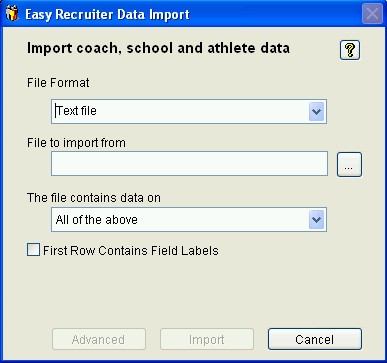
- Processing multiple types of files with related information requires running the file types in a specific order: Schools first, followed by Coaches, then Athletes.
- Complete the Basic Import screen by selecting the File Format your wish to use and specifying a File Name. You can optionally use the ellipses button to browse and select the file to use from either you local hard drives or network places. Click the "Import" button to process the specified file.
- Alternatively, you can use the "Advanced" button for processing customized import files using the Advanced Import feature. This allows you to use more flexible import files that can combine information from different types of contacts (Athlete, Schools, or Coaches) in a user-defined field order.
See also:
 Basic Import