To upgrade your Easy-Recruiter installation from version 1.2 to version 2.x and preserve the information in your system, complete the following steps using Windows Explorer.
Remove Current Version
Remove Current Version
- Make a backup copy of the Easy-Recruiter Data folder that is currently specified on the Settings Pane under the Data tab for the "Database Location" setting. You can use the ellipses (...) button beside this setting to see the full path on disk where the current Data Folder resides.
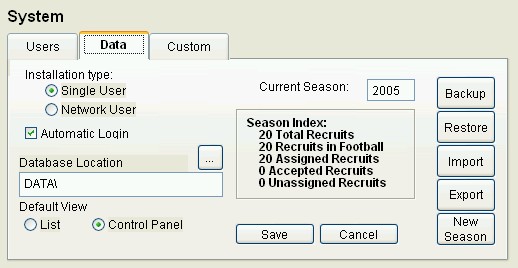
- This Backup Data Folder should be located in a temp directory or some place other than the current location, and you will need to access the contents of this folder later in the process.
- Uninstall Easy-Recruiter from all applicable machines.
Install New Version
- See New Single User Install to load the latest version of Easy-Recruiter.
- See New Network User Install (if applicable) to make necessary the settings to configure the system for use by multiple users.
- Make note of the New Data Folder location specified on the Settings Pane under the Data tab for the "Database Location" setting and then close and exit the system.
- Using Windows Explorer, navigate to the Backup Data Folder and select all the files contained inside of this directory.
- Copy the selected files in the Backup Data Folder
- Navigate to the New Data Folder and paste the contents from the old directory so that the copy/paste operation overwrites what is currently there.
- Close Windows Explorer and launch Easy-Recruiter. Just before the main screen is displayed you should receive an upgrade confirmation message indicating you version 1.x data was successfully upgraded for use with version 2.x.
Network User Considerations
- In Step 3 above, make sure all Easy-Recruiter users close and exit the application until the upgrade process is completed.
- In Step 7 above, make sure only one user accesses Easy-Recruiter for initial use in order to allow that workstation to receive exclusive access to the New Data Folder for the upgrade process. Once the upgrade confirmation is received on that one workstation, multiple users can once again access the system simultaneously.