When first opening Easy-Recruiter, users must typically enter a User ID and Password, then click OK when first opening Easy-Recruiter.
You can use the following username and login accounts after Installation initially. You can Maintain Users create and manage login accounts on the Settings Pane.
| User Id | Password |
| Admin | admin |
| test user | testuser |
Note - passwords are case sensitive.
If you are running in Single User Mode, under Advanced Data Settings you can set a system preference to override the login screen by turning on Automatic Login feature.
However, Network Users must always submit their User ID and Password to gain access to Easy-Recruiter.
Product Registration
You must register your copy of Easy-Recruiter to have full access to all of its features. Your Product Registration Key is provided to you AFTER you register your software with CompuSports. In order to provide you with a Product Registration number; CompuSports must know the Product Serial Number – which is unique for every Computer system. The Product Serial Number is displayed on the Settings Pane.
To get your Registration Key and enter it into Easy-Recruiter, you should do the following:
- Access the Settings Pane from the Task Bar.
- Click on the My Settings tab of the Settings Control Pane in the upper portion of the pane.
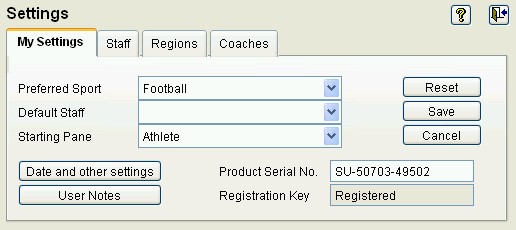
- Record the Product Serial Number exactly as it appears on the screen and send it to CompuSports along with the User Name and the Institution Name, either by E-mail (support@compusports.com) , by phone (301)-591-3886 or use the online registration for Easy-Recruiter by visiting the www.compusportsnetwork.com website.
- Enter the Product Registration Key that CompuSports provides to you into the lower right corner of this control panel.
- Remember to click the Save button on the My Settings tab to record your changes.