|
You MUST obtain a
"permanent
registration key" by
registering
your Easy-Cut software with CompuSports.
Registration removes all limitations on
the use of the software. Until Registered, Easy-Cut will
operate in Trial Mode for 21 Days. Trial mode limits the
number of plays in a project to 10.
Start the
Easy-Cut program
and select
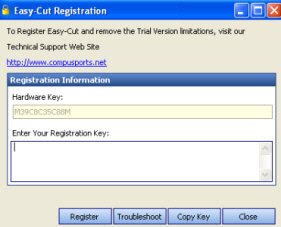
REGISTRATION from the Easy-Cut Help Menu. In Version 3 and
later you
will see the screen below.
 |
|
Registration Screen - Version 3 and later
Highlight the
Hardware Key and either type CTRL-C or click the Copy Key
button. This moves the Hardware Key to your Windows Clipboard |
- Highlight the
Hardware Key and either type CTRL-C, Right click and Hit
Copy, or Click Copy Key. This moves the Hardware Key to your Windows Clipboard
- Send
Your Hardware Key to CompuSports.
Be
sure to include your name and if the program was purchased
by a school, the School Name. You can paste
the Hardware ID into an email or enter it into our Online
Registration form.
- In most
circumstances, you will receive your Registration Key
within 24 hours, usually faster. We issue serial
numbers 7 days a week.
- Enter the
REGISTRATION KEY we issue to you in the space labeled “Enter
your Registration Data”.
- Click on
REGISTER
- Easy-Cut will
display a Thank You message if the registration is successful.
- Close the
Registration Screen, restart Easy-Cut and you will have a
permanently registered, full working version.
|