To remove the restrictions of demo (TRIAL) mode, it is necessary to complete a process that we refer to as REGISTRATION. In this process, YOU PROVIDE US with the HARDWARE ID number that is generated by your computer AFTER you install the Easy-Scout program, either from a download or from a CD, and WE PROVIDE YOU with a Serial Number that is unique to that computer.
YOU then enter the Serial Number in the space provided (see screen example below), click Register Now, and the Demo or TRIAL mode limitations on the number of games and plays, and access to several features on the Utilities Menu are removed.
When working in Trial Mode, if you try to access a function that is restricted, a message will be displayed followed by the Registration screen. The Registration screen can also be accessed from the Utilities Menu or Help Menu by selecting Register Easy-Scout.
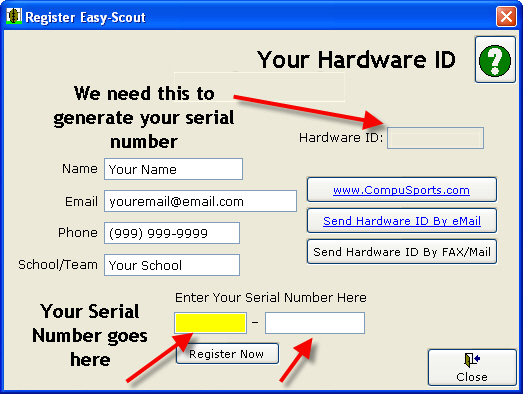
To complete the product registration process and receive a Serial Number, either:
- Use our Online Product Registration form for Easy-Scout XP and XP Plus (Please note that you will need to be able to receive eMail at the address you use to register in order to complete the Registration)
- Fill in your information for Name, Email address, Telephone number,
and School/Team on the form shown above and Click the Send Hardware ID by eMail
button to transmit registration information electronically (This
requires that Outlook or Outlook Express is installed and configured to
send email on the computer you want to register)
Or
- Create an email and send it to
support@compusports.com.
Include the purchaser's name, school if applicable, and the Hardware ID
number.
Or
- Click Send Hardware ID by Fax/Mail to print a report that can be transmitted by fax.
Or
After your registration information is processed you will receive a Serial Number (usually by email). Enter this Serial Number on the Easy-Scout Registration screen (shown above) and click the Register Now button. You should see a message that says Registration completed successfully, and All limitations imposed by the trial or demo mode will be removed.